The 60-Second Invoice: Mastering Voice-to-Invoice for Faster Payments
Choose your hands-free workspace
On your laptop / desktop
Copying numbers from client emails or fumbling with manual dashboards?
Get SMASH for Chrome
Build and push line-itemed invoices from Gmail in under 20 seconds.
Add to Chrome — FreeIn your truck / on-site
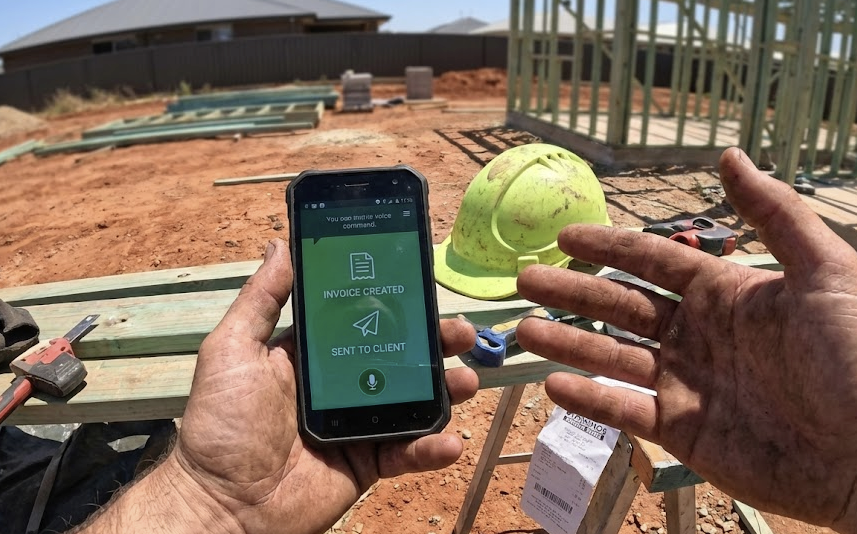
Dirty hands, cracked screen, no patience for typing on glass?
Get SMASH for mobile
Talk for 30 seconds. Drive away with the invoice already sent.
Download the iOS appGlobal compliance regions
US: Sales tax, QuickBooks sync · UK: VAT-compliant invoices · CA / NZ / AU: Local tax rules, Xero integration
Listen, we've all been there. You finish a solid day's work, you're knackered, and the last thing you want to do when you get home is stare at a laptop screen while your dinner gets cold. You tell yourself you'll "do the paperwork Sunday," but we both know how that ends.
Admin Sundays are the silent killer of the trades. But in 2026, if you're still "typing" invoices, you're essentially working for free for an hour every day. Stop Admin Sundays forever.
Why Your Voice is Your Best Tool (The Data)
It sounds like a gimmick until you look at the numbers. According to a 2025 Field Service Productivity Report, the average contractor spends about 14 hours a month just on data entry. By switching to voice-to-invoice, that drops to less than 2 hours.
Think about that. That's 12 hours back in your pocket. Whether that's 12 hours of extra billable time or 12 hours at the pub, it's a massive win. Stop losing money to the Paperwork Tax.
How It Actually Works (The "No-BS" Version)
Most people think voice-to-invoice is just Siri or a basic dictation tool. It's not. In 2026, AI-driven invoicing like Smash Invoices uses what's called Natural Language Processing (NLP).
When you say, "Hey Smash, invoice Dave for three hours of copper pipe repair and a new mixer tap," the system doesn't just write those words down. It:
- Identifies "Dave" in your client list.
- Pulls your pre-set hourly rate for "Plumbing Labor."
- Looks up the cost of a "Mixer Tap" from your inventory.
- Calculates the tax and builds a professional PDF.
You aren't just "talking"; you're commanding a digital assistant that knows your business better than you do after a long day. Voice to invoice on iPhone.
Quote first when they ask “how much?”
Same talk → verify → send loop wins the job with an instant quote on site, then converts to the invoice when the work is done. First priced answer back usually wins.
Why "Speed to Invoice" = "Speed to Bank"
There's a psychological trick in the trades: The "Freshness" Factor. A study by the Small Business Accounting Council found that invoices sent within 2 hours of job completion are paid 35% faster than those sent 48 hours later.
Why? Because the client still remembers the great job you did. If you send it three days later, it's just another bill they have to deal with. By using your voice to hit "Send" before you even start the truck, you're capturing that "happy customer" energy and turning it into cash immediately. Get paid in 48 hours, not 2 weeks.
The Safety Angle: Making "Windshield Time" Productive
We spend half our lives in the truck. Usually, that's dead time. By using voice-activated features, you can safely turn your commute into your admin hour.
Mate's Tip: Don't wait until you're home. Use the hands-free Bluetooth in the van. Dictate the invoice while you're pulling out of the driveway. By the time you hit the first red light, the invoice is in the client's inbox. Why your truck isn't an office.
Common Myths (And Why They're Wrong)
"It won't understand my accent." In 2026, AI models are trained on thousands of regional dialects. Whether you've got a thick Aussie drawl or a deep Southern twang, the tech has caught up. Why voice is 99% accurate now.
"It'll get the numbers wrong." You always get a "Review" screen. It takes one second to glance at the total before you hit send. It's still 10x faster than typing it from scratch.
The Bottom Line
If you want to grow your business this year, you have to stop being the bottleneck. You're a pro at your trade; don't let a keyboard turn you into a slow amateur.
Ready to bin the "Admin Sunday" for good? Give Smash Invoices a crack. It's built for us, by people who actually understand that a truck is an office, not a desk. Discover the ultimate tradie tech stack and see voice to invoice before you leave the job.
Frequently Asked Questions
How long does it take to create an invoice with voice?
Under 60 seconds total. You speak for 20-30 seconds describing the job, AI generates the invoice in 5 seconds, you review in 10 seconds, and send with one tap.
Does the AI understand different trades and industries?
Yes. SMASH learns from your past invoices and understands your industry terminology, materials, and pricing patterns - whether you are a mechanic, electrician, plumber, or any service trade.
Can I edit the invoice after AI generates it?
Absolutely. You always review and can edit any invoice before sending. SMASH provides an intelligent starting point, but you have full control.